Fstop
Documenting the Fstop API and SDK gave me the opportunity to think about the information developers need to get started with the API and successfully consume the API in their own code.
Designing the documentation workflow
I chose Astro's Starlight theme for Fstop's documentation because I was already familiar with it from my current website and a previous API project.
The challenge with Fstop was figuring out how to connect the API, OpenAPI specification (OAS), API reference documentation, and SDK.
The OAS sync pipeline
I knew I wanted API reference docs for the Fstop API, so I had to figure out how to get the OAS file from the API codebase into the documentation repo.
To solve this, I wrote a Bash script that uses drf-spectacular to generate the OAS file from the API code and then copy the OAS file to the Fstop API docs repo.
I created another Bash script in the API docs repo that uses Redocly to generate the API reference documentation from the copied spec. This gave me a repeatable workflow for updating the API reference docs whenever the API changed and reduced documentation drift.
Keeping the SDK up to date
The Fstop Python SDK is generated from the Fstop OAS file, which raised an important workflow question. What happens when the API changes? How do I regenerate the SDK?
Speakeasy uses a workflow.yaml file that dictates how the Speakeasy CLI interacts with sources (OAS files) and targets (the SDK).
In the workflow.yaml file, I provided the location of the Fstop OAS file as a source:
workflowVersion: 1.0.0
speakeasyVersion: latest
sources:
    Fstop:
        inputs:
            - location: ../fstop/schema.yml
Essentially, this says, "Grab the schema.yml file from the Fstop API repo and use that to generate the Python SDK."
This gives me a solid workflow to use when the API changes:
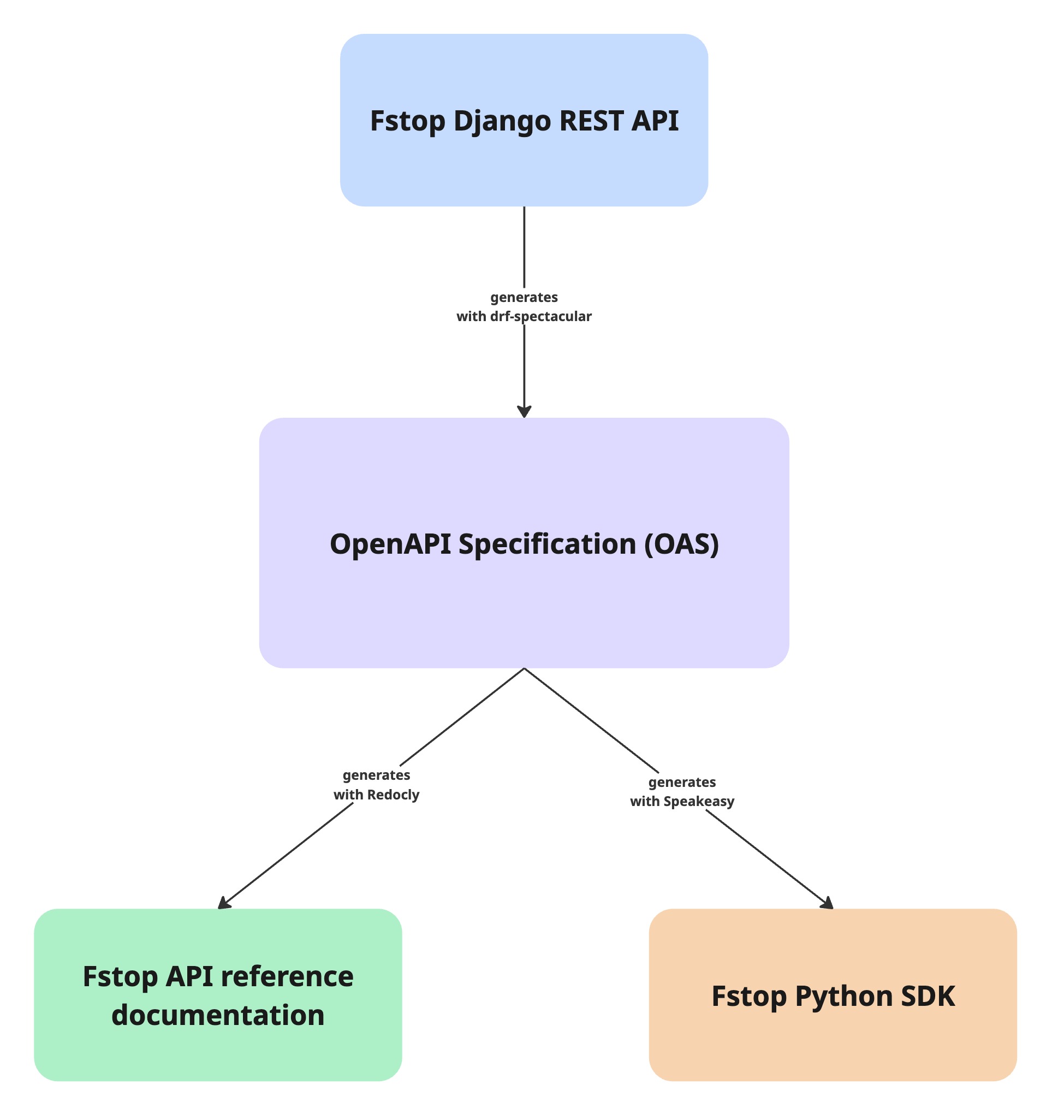
Essentially, the OAS acts as the shared source of truth for the API's reference documentation and SDK.
Why no separate SDK docs
The Python SDK is auto-generated from the OpenAPI spec using Speakeasy. Rather than creating separate SDK reference documentation, I included Python SDK examples alongside cURL examples in the API feature guides.
Descriptions for functions, return types, and other important information are all captured in docstrings. This means that developers using the SDK in their IDE get inline help without needing to view the docs.
The docstrings in the SDK came from the OAS file. When you define operation summaries, descriptions, and field documentation in your API code, drf-spectacular includes that in the OAS. Speakeasy then reads the OAS and uses it to generate the docstrings.
For example, the create_gallery function includes the operation summary, description, and parameter documentation:
def create_gallery(
        self,
        *,
        project_id: str,
        gallery_name: str,
        picture_count: int,
        is_visible: bool,
        url: str,
        retries: OptionalNullable[utils.RetryConfig] = UNSET,
        server_url: Optional[str] = None,
        timeout_ms: Optional[int] = None,
        http_headers: Optional[Mapping[str, str]] = None,
    ) -> models.Gallery:
        r"""Create a gallery

        Create a new gallery for a project.

        :param project_id: UUID of the project for this gallery
        :param gallery_name: Name of the gallery
        :param picture_count: Number of pictures in the gallery
        ...
What worked
Building and deploying the Astro site with Netlify was straightfoward. The big win was creating the OAS automation pipeline. Automating the process of generating and moving the OAS reduced manual work and made it easier to keep the API reference documentation and the SDK in sync with the API.
Friction points
The main challenge was managing the Speakeasy configuration file. Additionally, I still need to think of an easier way to pull SDK code examples from the SDK repo into the docs repo.
This experience reinforced the importance of having a clear source of truth for developer tooling. When the OpenAPI specification, API reference, and SDKs are all derived from the same source, they stay consistent as the API evolves.
--
View the Fstop API and SDK docs on Netlify.